
BOBPerformance FAQ
How to enable two-factor authentication (2FA) on BOBPerformance ?
Our help and technical support articles.
Date :
Your BOBPerformance account is even better protected: two-factor authentication via a mobile app is now mandatory when signing in.
How to enable two-factor authentication (2FA) on BOBPerformance ?
To strengthen the security of your account, signing in to BOBPerformance now requires two-factor authentication (2FA) via an authenticator app on your smartphone (Google Authenticator, Microsoft Authenticator, Authy, or any TOTP-compatible app). This step is added on top of your usual password and prevents access to your account even if someone were to find out your password.
Initial setup
- Install an authenticator app on your smartphone (available for free on the App Store or Google Play): Google Authenticator, Microsoft Authenticator, and Authy all work well.
- Sign in to BOBPerformance as usual, with your regular username and password.
- The first time you sign in after the security update, a page will ask you to re-enter your password to confirm your identity.
- A unique QR code is then displayed.
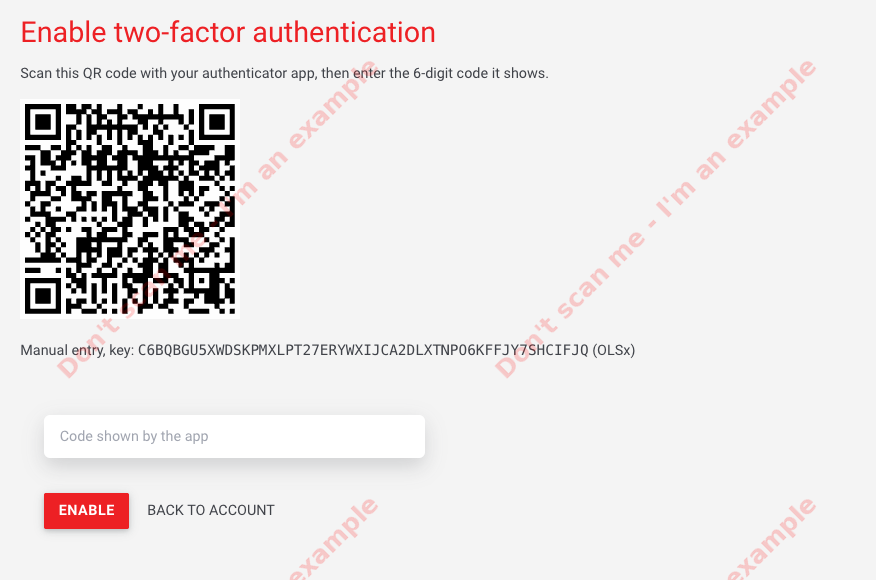
- Open the app, add an account (usually via a "+" button or "Scan a QR code"), then scan the QR code displayed on screen.
- The app immediately generates a 6-digit code, which automatically refreshes every 30 seconds. Enter this code on the BOBPerformance page to confirm activation.
- If backup codes are offered at this stage, keep them safe in a secure place (they will let you regain access to your account if you lose your phone).
Once these steps are complete, your account is protected by two-factor authentication.
At each sign-in
After entering your password, you will be asked for the 6-digit code generated by your authenticator app. Simply open the app on your phone, get the current code, and enter it to access your account.
I no longer have access to my app or I've lost my phone
If you kept your backup codes, you can use them to sign back in and reconfigure two-factor authentication on a new device. If you no longer have access to them, contact our support team via the chat available on bobperformance.co.uk or by email at support@bobperformance.com: we will manually reset two-factor authentication on your account after verifying your identity.
27 October 2026
15 April 2026
03 April 2026